

━━━━━━━━━━━━━━━━━━━━━━━━━━━
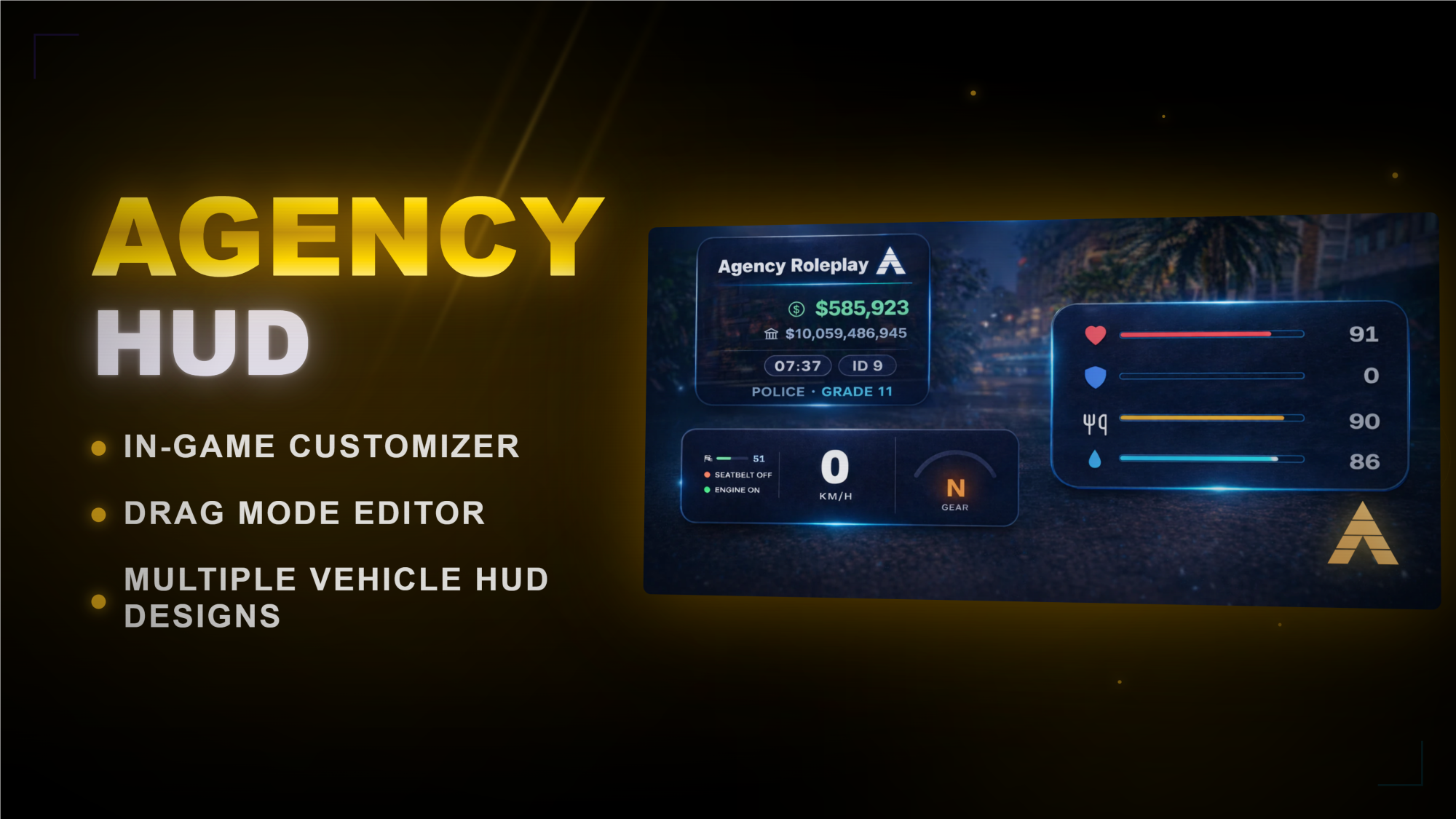
🎨 AGENCY HUD — Advanced Premium HUD for FiveM
━━━━━━━━━━━━━━━━━━━━━━━━━━━

━━━━━━━━━━━━━━━━━━━━━━━━━━━
✨ FEATURES
━━━━━━━━━━━━━━━━━━━━━━━━━━━
🎮 FULL IN-GAME CUSTOMIZER
Change your HUD directly in-game with a clean settings menu. No need to edit files for normal customization. Players can adjust their HUD exactly how they want.
🖱️ DRAG MODE LAYOUT EDITOR
Move supported HUD elements freely with an intuitive drag mode. Fine-tune positions visually instead of guessing coordinates in config files.
🎨 COMPLETE STYLE CUSTOMIZATION
Choose accent colors, background colors, opacity, scale, theme mode, visibility settings, and layout options. Build a HUD that matches your exact server style.
🌗 DARK MODE & WHITE MODE
Includes both dark and light theme variants with matching colors, styling, and polished UI elements.
🚗 MULTIPLE VEHICLE HUD DESIGNS
Comes with multiple speedometer styles, including clean minimal layouts and a round analog design. Players can choose the version they prefer directly in the vehicle HUD menu.
✈️ SPECIAL HUDS FOR AIRCRAFT & BOATS
Aircraft and boats are automatically detected and get their own matching vehicle HUD variants. Includes aircraft altitude display and boat wave/swell display for a more immersive experience.
🎤 SMART VOICE SYSTEM SUPPORT
Supports automatic voice backend detection and adapts the HUD to the voice system being used. Works with pma-voice, SaltyChat, and keyboard fallback voice mode.
📡 SALTYCHAT & PMA-VOICE READY
Displays live voice state, range labels, radio state, and warning status. If SaltyChat is not connected, the HUD can show a clear in-game warning on the microphone indicator.
📱 AGENCY PHONE INTEGRATION
Detects when Agency Phone is open and automatically shifts bottom-right HUD elements so they do not overlap awkwardly with the phone UI.
🛠️ GLOBAL ADMIN MENU
Includes an admin panel for server-wide defaults such as branding, logo, colors, locale, and layout presets. Perfect for setting a strong default style for every player.
🏷️ FULL BRANDING SUPPORT
Customize server name, logo, tag, branding colors, background behavior, and overall visual identity. Make the HUD feel truly unique to your server.
🌍 15 LANGUAGES INCLUDED
English, German, French, Spanish, Italian, Portuguese, Dutch, Polish, Czech, Slovak, Russian, Turkish, Romanian, Hungarian, and Swedish.
⚡ FRAMEWORK AUTO-DETECTION
Works with automatic framework detection and supports QBCore, ESX, Qbox, ox_core, ND, and Standalone setups.
💾 PERSISTENT PLAYER SETTINGS
HUD and vehicle HUD settings are saved, so players keep their personal setup after reconnects and server restarts.
🔓 HIGHLY EDITABLE
Config, locales, HTML, CSS, JS, and overall styling can be customized to fit your server perfectly.
━━━━━━━━━━━━━━━━━━━━━━━━━━━
📋 ADDITIONAL DETAILS
━━━━━━━━━━━━━━━━━━━━━━━━━━━
✓ Clean premium NUI design with smooth animations
✓ Fade in / fade out transitions for HUD elements
✓ Adjustable opacity, scale, and positioning
✓ Individual visibility toggles for many HUD elements
✓ Player HUD and vehicle HUD can be customized separately
✓ Free positioning and preset positions
✓ Voice indicator with dynamic labels and warning states
✓ Custom street name styling with matching HUD color tint
✓ Vehicle HUD preview inside the settings menu
✓ Server branding can be shown or hidden as needed
✓ Light and dark theme styling across menus and HUD
✓ Optimized for a modern and responsive feel
━━━━━━━━━━━━━━━━━━━━━━━━━━━
📦 DEPENDENCIES
━━━━━━━━━━━━━━━━━━━━━━━━━━━
[REQUIRED] None for basic standalone usage
[OPTIONAL] pma-voice or SaltyChat — Advanced voice system integration
[OPTIONAL] Agency Phone — Automatic HUD offset handling when phone is open
[OPTIONAL] QBCore / ESX / Qbox / ox_core / ND — Auto-detected framework support
━━━━━━━━━━━━━━━━━━━━━━━━━━━
🚀 INSTALLATION
━━━━━━━━━━━━━━━━━━━━━━━━━━━
Drag Agency-Hud into your resources folder
Add ensure Agency-Hud to your server.cfg
Configure config.lua to your liking
Add your logo / branding assets if needed
Restart the resource or your server
Open the HUD menu in-game and customize everything live
━━━━━━━━━━━━━━━━━━━━━━━━━━━
💬 SUPPORT
━━━━━━━━━━━━━━━━━━━━━━━━━━━
Need help? Join our Discord for support, updates, and future releases.
https://discord.gg/RTax3aBMUs
━━━━━━━━━━━━━━━━━━━━━━━━━━━
Agency Scripts — Premium FiveM Resources